Shared Database (MSSQL) FAQ
What are shared databases
A shared database is your personal isolated database on a shared MS SQL Server instance.
Previously, users had to spend a lot of their plan resources to run their own database server. Now the approach has changed: we've launched a shared MS SQL Server instance, and any user can simply click the "MS SQL Server" button on the application creation page (under "Launch a database") to get connection credentials for their database on this server.
Despite the fact that these databases are on a shared MS SQL Server, access to them is isolated, meaning no one else can connect to them.
If you've used MS SQL Server before, you won't notice any difference in terms of usage with shared databases.
Shared databases are available starting from the "Bronze" plan. Each database is allocated a minimum of 25MB by default. Depending on your plan, you'll have access to a certain amount of storage and databases:
| Plan | No. of DBs | Total Size (MB) |
|---|---|---|
| Pause | 0 | 0 |
| Start | 0 | 0 |
| Bronze | 1 | 100 |
| Silver | 2 | 200 |
| Gold | 4 | 400 |
| Platinum | 6 | 600 |
| Diamond | 8 | 800 |
| Titan | 10 | 1000 |
Can't connect via SQL Server Management Studio (SSMS)
Most connection issues are caused by incorrect connection details. In MS SQL Server, unlike many other DBMS, the IP and port are separated by a comma. Example: 11.11.111.11,30008.
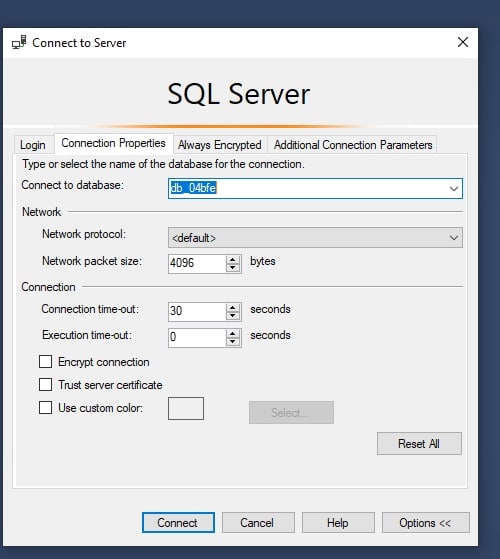
You need to specify the database name in the Connection Properties tab:
(the database name can be found on your database application page in deploy-f)
To troubleshoot connection issues, check the error message in the Logs tab on the application page.
Didn't find an answer?
Still have questions? Ask us in the Telegram support chat